- Teeth brushed yet?
- Is your bag packed?
- Make your bed.
- Piano. Now, please.
- Pack your toys away!
Nag-free
mornings.
KidTick turns the old iPad in your drawer into a task wall for your kids. They see what needs doing, tick it off themselves, and you approve from your phone.
Start freeFree during our trial · Sign in with Google · Ready in 15 minutes
Ten things you say every morning
- Teeth brushed yet?
- Is your bag packed?
- Water bottle?
- Where's your lunchbox?
- Socks go on your feet, not in your hand.
- Make your bed.
- What did I just say?
- We're leaving in five minutes!
- I'm counting to three.
- Why do I have to say this every single day?
By number ten, it's usually an argument. Your kids aren't ignoring you. The list just lives in your head, not theirs. Put it on the wall where they can see it and tick it off, and you can stop being the human alarm clock.
Kids tick it off themselves
Each child gets their own column, colour and avatar. Every task has an icon, so even a four-year-old who can't read yet can find theirs. Go on, try tapping the wall on this page.
- 🎒 Pack bag
- Grey: not done yet.
- 🎒 Pack bag
- One tap turns it yellow: done, and waiting for Mum or Dad to check.
- 🎒 Pack bag ✅
- Green once you approve. Only then are the tokens added.
Switch on the iPad's built-in Guided Access and kids can't wander into other apps or see ads.
You approve from your phone
Every tap sends a notification to your phone. Whether you're in the kitchen or on the train, one glance is all it takes to approve, and the task on the wall turns green straight away.
- Once the kids tick something off, it shows up here.
Tokens add up to a wish
Every task earns tokens: 1 for brushing teeth, 5 for piano practice, or whatever you decide. Kids save up for something they've picked themselves. Once they have enough, they tap "Redeem" on the tablet and you give the final OK.
Mia has enough. She can tap "Redeem" now.
You can add bonus tokens too, like birthday money from the grandparents.
Write a listGet a task wall
- 🦷Brush teeth+1
- 🎒Pack school bag+2
- 🥪Grab lunchbox+1
- 🧦Put on socks+1
- 💧Fill water bottle+1
What parents say
Illustrative: these are families we imagined while designing KidTick, not real reviews. We'll replace them with real feedback from our trial families.
-
Illustrative
I used to shout "Teeth!" ten times every morning. Now they go to the wall and tick it off themselves, my phone buzzes, and I tap approve. I'm not the nag any more.
Mum of two · Melbourne -
Illustrative
Neither of them can read yet, but they each know their own colour and picture. Whoever finishes first races over to show me. I didn't expect that, but our mornings are a lot calmer now.
Dad of four-year-old twins · Sydney -
Illustrative
Our old iPad went from the drawer to the wall, and we didn't have to buy a thing. Guided Access keeps the kids on the task wall, which gives me peace of mind.
Mum with an old iPad on the wall · Brisbane -
Illustrative
The first set-up took me a while, about half an hour. But once it's done, the tasks show up every weekday and I haven't had to touch it since.
Working dad · Perth -
Illustrative
My partner and I each sign in with our own Google account. Whoever's free approves, and we've stopped asking each other, "Did you check it yet?"
Two working parents · Melbourne -
Illustrative
She saved her tokens for three weeks to get her Lego, checking the progress bar every day. It's the first time I've seen her happy to wait for something.
Mum of a seven-year-old · Sydney -
Illustrative
The iPad has to stay plugged in, so you need to pick a spot and leave it there. That's fine for us, but if you want something you can pack away after each use, it might not suit you.
Dad with an honest take · Adelaide -
Illustrative
I approve the kids' tasks on the tram. When I get home and they show me their new tokens, the look on their faces is my favourite part.
Commuting mum · Melbourne
Kids have earned rewards for 200 years
Merit cards, stickers, stamps: kids have always loved a reward they've earned. KidTick puts it on the wall.
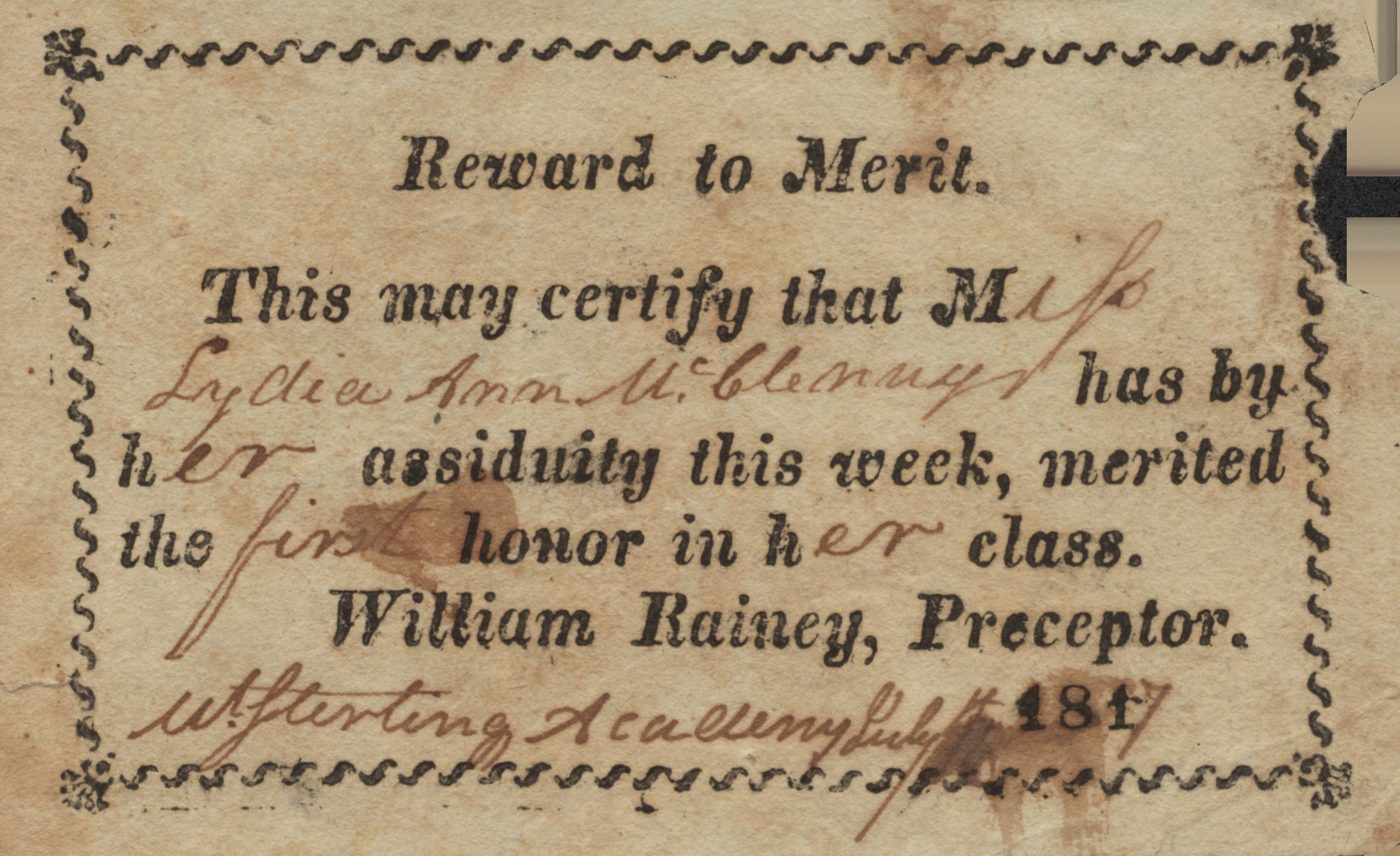
Today: the small rewards kids still love
- Sticker chart
- "Great job!" stamp
- Medal
KidTick turns them into tokens on the wall
Set up in 15 minutes
No new screen to buy and no app to download. Create your family on your phone, type a pairing code into the tablet, and you're done. Kids don't need accounts.
Your partner can join with an invite link and manage everything with their own Google account.
Reward of Merit
Set-up checklist
On your phone
- Create your family with Google5 min
- Add the kids and choose daily tasks3 min
- Get a 6-digit pairing code10 sec
On the tablet
- In Safari, tap "Add to Home Screen"1 min
- Enter the pairing code30 sec
- Turn on Guided Access (optional)2 min
Later
- Invite your partner (optional)3 min
Task wall readyabout 15 min
Free during the trial
Smart home displays can cost hundreds of dollars, plus a monthly subscription. KidTick runs on the iPad you already own. We haven't decided on paid plans yet, and we'll let you know well before anything changes.
A$0
- Works on the iPad or tablet you already have
- No accounts for kids, no ads on the tablet
- Two parents, each with their own Google login
- English and Chinese interface
Common questions
What kind of iPad do I need?Any iPad that runs Safari and can "Add to Home Screen" will do, even an old one. Mount it on the wall in landscape, or stand it on a shelf or bench in the living room. Android tablet support is still being tested.
Do the kids need an account or email?No. Once the tablet is paired, it simply shows everyone's tasks for the day.
Can the kids get into other apps?Not if you use the iPad's built-in Guided Access, which locks the screen to KidTick. Only a parent can unlock it.
Can kids give themselves tokens?No. Kids can tick off tasks or add a one-off task of their own, but tokens are only added once a parent approves.
Can both parents manage it?Yes. Create an invite link in Settings and send it to your partner. The link is valid for seven days, and they join with their own Google account.
Can I change settings on the tablet?Day-to-day things, like approving tasks and adding events, yes, with your parent PIN. Inviting a parent or pairing a new tablet can only be done from your phone.
What if the tablet goes missing?Unpair it from Settings on your phone, and it stops working within a minute.
Where is my data stored?In a cloud database, with each family's data kept separate. Only your family's parents and paired tablets can see it.
How is this different from a sticker chart?With a sticker chart, a grown-up has to remember to hand out stickers and keep count. KidTick puts up each day's tasks automatically and tallies the tokens for you, so kids can always see how close they are to their goal.
Does it cost anything?It's free during the trial. We'll let you know before any paid plan starts.